How to Automate Podcast Show Notes with OpenAI
Let’s be honest: You started a podcast to speak, not to type. But learning how to automate podcast show notes is the single best way to reclaim your time and keep your production schedule on track.
Recording an episode feels amazing. But the “post-production” phase—listening to the audio, picking timestamps, and writing summaries—usually takes at least 45 minutes per episode. It is boring, repetitive, and kills your creative momentum.
But what if you could fire yourself from this job?
What if a robot could listen to your episode and write perfect, SEO-optimized show notes in just 30 seconds? In this guide, I will show you exactly how to build an automated machine using Make.com and OpenAI (GPT-4).
The “Easy Button”: Don’t Want to Build It Yourself?
Before we dive into the technical tutorial, I have good news.
You do not actually have to build this automation from scratch. I have already built, tested, and packaged this entire workflow into a ready-to-use Make.com Blueprint.
If you want to skip the setup and just start saving time immediately, you can download the blueprint right now:
👉 Get the Free AI Show Notes Blueprint
However, if you are the DIY type and want to learn how to automate podcast show notes manually, keep reading. Here is the step-by-step breakdown.
What You Will Need
To set this up, you need three things:
- A Make.com Account: The free plan is perfectly fine for this (it includes 1,000 operations).
- An OpenAI API Key: This connects Make to GPT-4. (Don’t worry, it costs pennies—literally about $0.05 per episode).
- Your Podcast RSS Feed: The link you get from your host (Buzzsprout, Libsyn, Anchor, etc.).
Step 1: The Trigger (Watch Your Feed)
The first step to automate podcast show notes is to tell our robot when to work.
- Log in to Make.com and create a new Scenario.
- Search for the RSS module.
- Select the trigger called “Watch RSS feed items.”
- Paste your podcast’s RSS feed URL into the box.
What this does: Make will now check your feed periodically. As soon as it sees a new episode, it grabs the data and triggers the next step.
Step 2: The Brain (OpenAI Analysis)
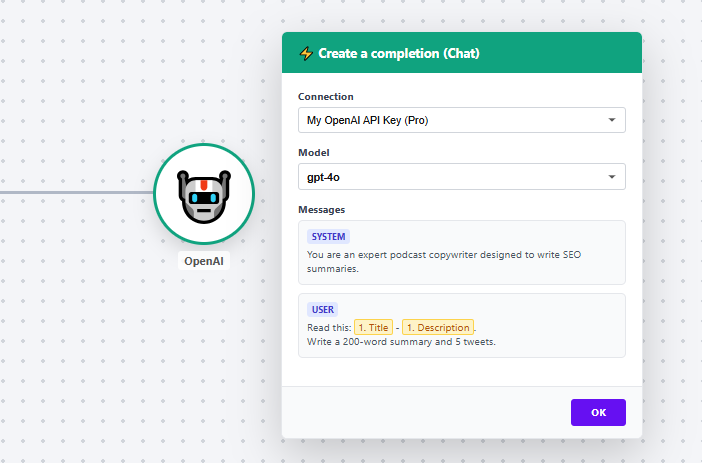
This is where the magic happens. We are going to send your episode information to Artificial Intelligence.
- Add a new module next to RSS and search for OpenAI.
- Select “Create a completion (Chat).”
- Connect your OpenAI account.
- Select Model: Choose
gpt-4ofor best quality.
The Secret Prompt:
In the “Messages” section, copy and paste this prompt to ensure high-quality outputs:
“System Role: You are an expert podcast copywriter. User Message: Please read the following title and description: [RSS Title] – [RSS Description]. Write a 200-word engaging summary, 3 bullet points of key takeaways, and 5 tweets to promote this episode.”
Step 3: The Storage (Save to Google Docs)
The AI has written the text, but now we need to save it.
- Add the final module: Google Docs.
- Select “Create a Document.”
- Map the
[RSS Title]to the document name and the[OpenAI Output]to the content.
Now, every time you publish, your show notes will appear in your Drive automatically. This is the power of knowing how to automate podcast show notes.
Frequently Asked Questions (FAQ)
Can I automate podcast show notes for free?
Yes. By using the Make.com free plan (1,000 ops/month), you can process dozens of episodes for free. You only pay a very small amount to OpenAI for the API usage.
Is GPT-4 better than ChatGPT for show notes?
Using the API (as shown in this guide) is better because it is automated. You don’t have to copy-paste text back and forth. It runs in the background while you sleep.
Do I need coding skills?
No. If you follow this guide, you can set it up in 10 minutes. Or, you can simply download our pre-built blueprint to skip the setup entirely.
Conclusion
Stop wasting your creative energy on administrative tasks. If you want to scale your show in 2025, you must learn to automate podcast show notes. Let the robots handle the writing, so you can focus on the recording.
Related: Wondering about costs? Check out our comparison of Make.com vs Zapier for Podcasters.