If you are an indie podcaster, you know the struggle. You aren’t just a host; you are also the audio engineer, the graphic designer, the social media manager, and the copywriter.
The dream is to focus solely on the content—recording great interviews and telling compelling stories. But the reality is that 80% of your time is spent on “busy work”: converting files, writing show notes, posting to social media, and emailing guests.
This is where Podcast Automation comes in.
When you start looking for automation tools, you will inevitably run into the two giants of the industry: Zapier and Make.com (formerly Integromat).
Zapier is the famous one. It’s the brand everyone knows. But if you are a podcaster on a budget, is it the right choice? Or is Make.com the hidden gem that can save you hundreds of dollars a year?
In this comprehensive guide, we will compare Make.com vs Zapier specifically for podcasters. We will break down the pricing, the features, and why one platform is the clear winner for automating your podcast workflow in 2025.
- The Big Problem: The "Zapier Tax"
- Enter Make.com: The Podcaster’s Best Friend
- Feature Comparison: The Free Plans Side-by-Side
- The "Multi-Step" Workflow: Why You Need It
- Usability: Linear vs. Visual
- The Verdict: Why Make is the Winner for Indie Podcasters
- Start Automating Today (For Free)
- Frequently Asked Questions
The Big Problem: The “Zapier Tax”
For years, Zapier has been the go-to tool for connecting apps. It’s easy to use, has a massive library of integrations, and works well.
But for podcasters, Zapier has a major flaw: The Pricing Model.
Podcasting workflows are rarely simple. You don’t just want one thing to happen when you publish an episode. You want a sequence of things to happen.
- Trigger: New episode published on RSS feed.
- Action 1: Send transcript to ChatGPT.
- Action 2: Create a tweet from the summary.
- Action 3: Post to LinkedIn.
- Action 4: Save to Google Drive.
In automation terms, this is called a “Multi-Step Workflow.”
Here is the kicker: Zapier does NOT allow Multi-Step Zaps on their Free Plan.
If you want to build the workflow described above on Zapier, you have to upgrade to their “Starter” plan, which currently starts at $29.99 per month (billed monthly). That is nearly $360 a year—more than the cost of your podcast hosting and microphone combined.
For many indie podcasters, that price point is a dealbreaker.
Enter Make.com: The Podcaster’s Best Friend
Make.com (formerly Integromat) works similarly to Zapier. It connects App A to App B. However, its business model is fundamentally different in a way that benefits creators.
Make.com offers Multi-Step scenarios on their Free Plan.
This means you can build complex, professional-grade automation workflows—connecting your RSS feed to OpenAI, LinkedIn, Twitter, and Google Sheets simultaneously—without paying a single cent.
For a podcaster looking to scale without increasing overhead costs, this distinction is everything.
Feature Comparison: The Free Plans Side-by-Side
Let’s look at the hard data. If you are starting today with $0 budget, what do you get?
| Feature | Zapier (Free Plan) | Make.com (Free Plan) | Winner |
| Monthly Cost | $0 | $0 | Tie |
| Workflow Limit | 5 Single-step Zaps | 2 Active Scenarios | Make (Complex flows allowed) |
| Multi-Step Workflows | ❌ No (Paid only) | ✅ Yes | Make (Huge Win) |
| Operations / Tasks | 100 Tasks / mo | 1,000 Ops / mo | Make (10x more) |
| Update Time | Every 15 mins | Every 15 mins | Tie |
| Visual Interface | Linear (List view) | Drag & Drop (Bubble view) | Make |
| Logic (Filters/Routers) | ❌ No (Paid only) | ✅ Yes | Make |
Understanding “Tasks” vs “Operations”
To be fair, we need to explain how they count usage.
- Zapier counts a “Task” every time an action is successfully performed.
- Make counts an “Operation” every time a module is triggered.
While the counting method is slightly different, the volume difference is undeniable. Make gives you 1,000 operations for free. Zapier gives you 100.
If you publish 4 episodes a month, 100 tasks might be enough for very basic sharing. But 1,000 operations on Make allows you to run powerful AI analysis, distribute to five different platforms, and archive your data, with plenty of room to spare.
The “Multi-Step” Workflow: Why You Need It
Why do I keep mentioning “Multi-Step” workflows? Why can’t you just use simple, one-step automations?
Let’s look at a real-world podcasting scenario.
The “Simple” Way (Zapier Free Plan):
You want to tweet when you publish an episode.
- Trigger: RSS Feed New Item.
- Action: Create Tweet.
- Result: You get a tweet that says “New episode: [Title] [Link]”.
It’s boring. It looks robotic. It gets zero engagement.
The “Pro” Way (Make Free Plan):
You want to create a viral thread on social media using AI.
- Trigger: RSS Feed New Item.
- Action 1 (HTTP Request): Download the audio or show notes.
- Action 2 (OpenAI): “Read this text and write a funny, engaging LinkedIn post about it.”
- Action 3 (LinkedIn): Post the AI-written content with the link.
- Action 4 (Google Sheets): Log the post URL for your records.
This workflow requires 4 steps.
- On Zapier, this costs $29/mo.
- On Make, this is Free.
By using Make, you aren’t just “automating”; you are enhancing your content quality using AI tools that Zapier locks behind a paywall.
Usability: Linear vs. Visual
This is the one area where Zapier usually wins points for beginners, but Make is catching up fast.
Zapier uses a linear, list-based editor. It says “If this happens, do that.” It is very easy to understand if you are non-technical.
Make uses a visual “bubble” editor. You can drag and drop modules, connect them with lines, and watch the data flow like little dots moving between apps.
Why Make’s Visual Editor is Better for Podcasters:
Podcasting logic isn’t always linear. Sometimes you want to say:
“If the guest is a VIP, send an email to my assistant. If the guest is regular, just save the file.”
Make allows you to add a Router (a fork in the road). You can visually see the logic split. In Zapier, building this logic is cumbersome and often requires expensive upgrades.
While Make might look intimidating for the first 10 minutes, once you connect your first two bubbles, you will realize how much more control you have. It feels like playing with LEGOs rather than filling out tax forms.
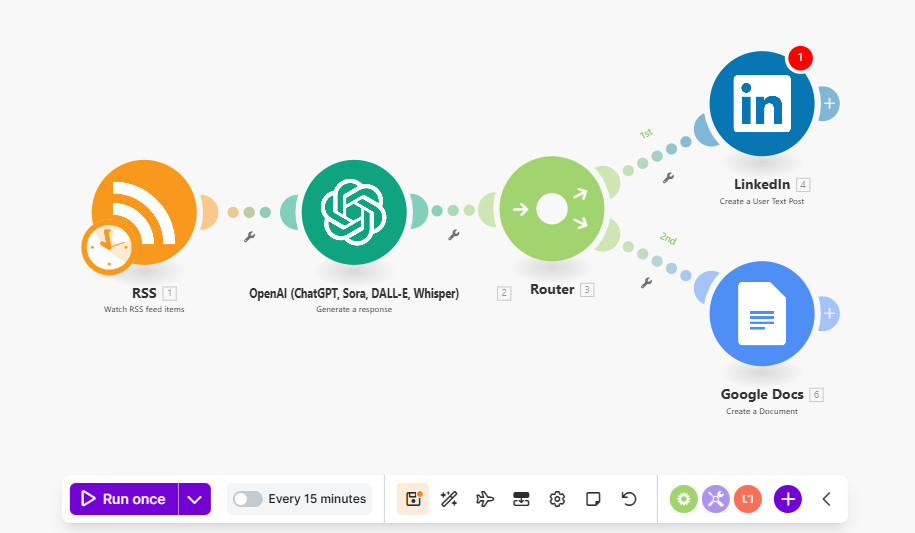
Make’s visual editor allows for complex logic (like Routers) without coding
The Verdict: Why Make is the Winner for Indie Podcasters
If you are an enterprise company with an unlimited budget, Zapier is a fantastic tool. But for indie podcasters, the choice in 2025 is clear.
Make.com wins because:
- It respects your budget: You shouldn’t have to pay $29/mo just to post to LinkedIn automatically.
- It empowers you with AI: You can connect OpenAI/ChatGPT in complex chains for free.
- It scales with you: 1,000 free operations is enough to support a weekly podcast comfortably.
Is there a catch?
The only “catch” is that you have to build the blueprint (the workflow) yourself. You have to tell Make: “Watch the RSS feed, then send to LinkedIn.”
For a non-technical person, staring at a blank screen can be scary.
But I have solved that problem for you.
Start Automating Today (For Free)
I believe every podcaster should have access to these tools, regardless of their technical skill. That is why I built PodTools.cc.
I have already done the hard work. I have built the Make.com blueprints, tested them, and packaged them up for you.
Best of all learn how to code. There is no need figure out API keys. All you have to import my blueprint into your free Make account.
Want to try it out?
Start with our most popular automation. It watches your podcast feed and automatically publishes a professional post to your LinkedIn profile every time a new episode goes live.
(Clicking this will take you to the setup guide – it takes less than 5 minutes)
Stop paying the “Zapier Tax.” Switch to Make, save your money for better recording gear, and let the robots handle the busy work.
Frequently Asked Questions
Q: Is Make.com difficult to learn?
A: It has a slight learning curve compared to Zapier, but our pre-built blueprints remove the complexity. You just import and click “On.”
Q: Can I switch from Zapier to Make?
A: Yes. Most apps supported by Zapier are also on Make. The transition is usually seamless.
Q: Do I need a credit card for Make’s free plan?
A: No. You can sign up with just an email address.
Q: Does this work with any podcast host?
A: Yes. As long as your podcast host (Buzzsprout, Libsyn, Anchor, etc.) gives you an RSS Feed URL, you can use these automations.