Podcastle Review (2026): Is This the Best Podcast Editor for Chromebook Users?
We spent 30 hours testing Podcastle’s “Magic Dust,” AI transcription, and local recording features. Here is the brutally honest truth about the browser-based studio.
Updated: Dec 16, 2025 | By Audio Engineer & PodTools Team
Start for Free (Unlimited Recording) →
Disclosure: This is an independent review. We may earn a commission if you sign up through our links, but we are not paid by Podcastle to write this.
The “Chromebook Dilemma” in Podcasting
For years, podcasting had a high barrier to entry: Hardware. If you wanted to produce a high-quality show, the advice was always the same: “Buy a MacBook Pro and learn Adobe Audition.”
But what if you only have a Chromebook? Or an older Windows laptop that freezes when you open Photoshop? What if you are a corporate user who isn’t allowed to install software on your work computer?
Until recently, you were out of luck. Audacity doesn’t run on ChromeOS. Descript’s web version is a heavy resource hog. Zoom’s audio quality is unacceptable for professional publishing.
This is exactly why Podcastle exists. It is built to solve the hardware limitation problem by moving the heavy lifting from your processor to the cloud.
See our list of the Best AI Podcast Software
What Exactly is Podcastle?
Podcastle marketing calls it an “AI Studio,” but practically speaking, it is three separate tools combined into one browser tab:
- A Remote Recorder: Think of it as a better version of Zoom that records high-quality WAV files locally.
- An AI DAW (Digital Audio Workstation): An editor where you can cut audio, add music, and fix sound issues.
- A Hosting Platform: A place to store your episodes and push them to Spotify/Apple Podcasts.
The promise is simple: One URL for everything. No downloads, no plugins, no file transfers.
Feature #1: The Recording Studio (Local Recording Explained)
We tested the recording feature with a guest who had a notoriously unstable internet connection (5 Mbps upload). Usually, on Zoom, their video would pixelate, and the audio would sound robotic (the “underwater” effect).
How It Performed:
Podcastle uses Local Recording technology. This means when you hit “Record,” the browser captures the raw audio from your microphone before it travels over the internet. It stores this high-quality data in your browser’s cache and uploads it progressively.
The Result: Even though our guest’s video froze twice during the call due to bad WiFi, the final downloaded WAV file was flawless. No dropouts. No compression artifacts.
Feature #2: Text-Based Editing (The Workflow)
If you have ever edited a podcast in Audacity, you know the pain of staring at waveforms. You see a squiggle, but you don’t know if that squiggle is a word, a laugh, or a cough.
Podcastle copies the revolutionary workflow made famous by Descript: Edit Audio by Editing Text.
Our Speed Test
We took a raw 30-minute interview and tried to edit it down to 20 minutes.
- Step 1 (Transcription): We uploaded the file. Podcastle transcribed it in about 2 minutes. Accuracy was around 95% (slightly lower than Otter.ai, but good enough).
- Step 2 (Cutting): We highlighted boring paragraphs and hit “Delete.” The audio cut instantly.
- Step 3 (Silence Removal): We used the AI Silence Remover. It detected 84 pauses longer than 2 seconds. We removed them all with one click.
Total Time: 12 minutes.
Estimated Time in Audacity: 45 minutes.
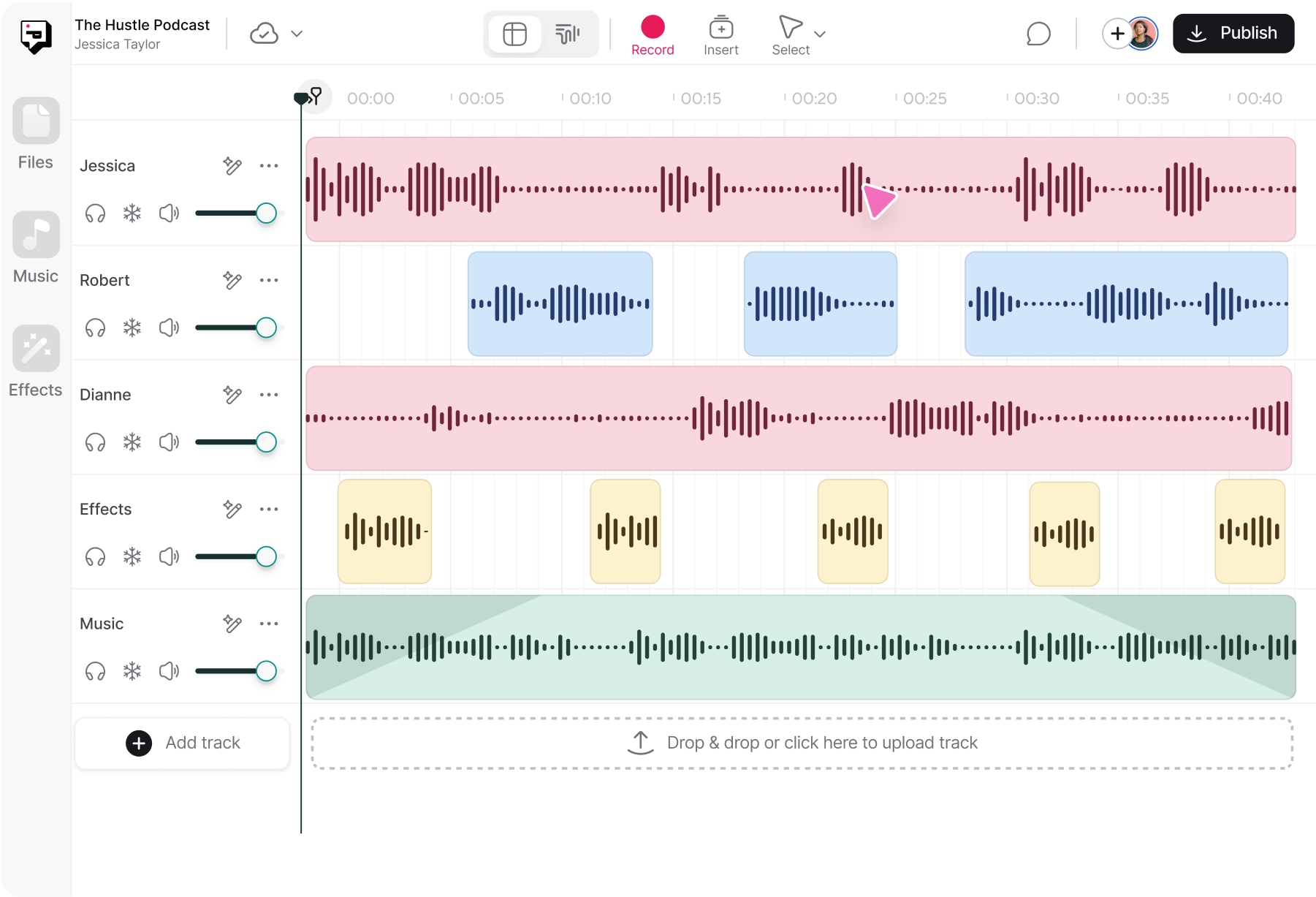
For a Chromebook user, having this level of power in a browser is unprecedented.
Feature #3: The “Magic Dust” Stress Test
Every AI tool claims to remove noise. Most of them just ruin your voice. We put Podcastle’s “Magic Dust” through an extreme stress test.
Scenario A: The Air Conditioner Hum
Setup: Recorded next to a loud AC unit.
Result: 10/10. The hum vanished completely. The voice remained rich and deep.
Scenario B: The Echoey Kitchen
Setup: Recorded in an empty room with tiled floors (reverb nightmare).
Result: 8/10. It significantly reduced the echo (de-reverb), making it sound like a carpeted office. It wasn’t quite “studio” quality, but it was usable.
Scenario C: The “Dog Barking” Test
Setup: A dog barked while I was speaking.
Result: Fail. Magic Dust is a noise reducer, not a magic wand. If a noise overlaps with your voice, it can’t separate them perfectly. No tool can do this perfectly yet.
Comparison vs. Adobe Enhance: Adobe Enhance is more aggressive. It removes everything, but sometimes makes you sound like a robot. Podcastle is more conservative—it leaves a tiny bit of room tone, but your voice sounds human. We prefer Podcastle for long-form content.
Feature #4: Revoice (AI Voice Cloning)
This feature feels like science fiction. You can clone your own voice to fix mistakes without re-recording.
How it works:
- You record 70 sentences shown on the screen (takes about 15 minutes).
- Podcastle’s AI processes your voice model (takes about 24 hours).
- Once ready, you can type any text, and it will speak it in your voice.
Is it realistic?
We tested this by inserting a generated sentence into a real recording.
“Welcome back to the [Generated: PodTools Show], I’m your host…”
The tone match was scary good. The cadence (rhythm) was slightly off, but for fixing a single word or a short intro, it is imperceptible to the average listener.
Bonus: The Mobile App (iOS)
Most browser tools neglect mobile. Podcastle has a dedicated iOS app. It acts as a high-quality field recorder.
The killer feature here is the sync. You can record an interview on your iPhone while walking, and by the time you sit down at your Chromebook, the file is already in your project dashboard waiting to be edited. It’s a seamless ecosystem.
Comparison: Podcastle vs The Giants
How does it stack up against the industry leaders?
| Feature | Podcastle | Descript | Audacity |
|---|---|---|---|
| Best For | Chromebook / Audio Beginners | Mac/PC / Video Pros | Free / Manual Editing |
| Platform | Web (Cloud) | Desktop App (Heavy) | Desktop App (Light) |
| AI Cleaning | Magic Dust (Natural) | Studio Sound (Strong) | Manual plugins only |
| Video Editing | Basic | Advanced | None |
Is the Price Justified?
Podcastle offers a “Basic” free plan, but is it usable? Or is it a trap?
- Free Plan: You get unlimited recording and multi-track editing. BUT, you can only use Magic Dust 3 times, and exports are MP3 (160kbps). This is fine for hobbyists, but not for pros.
- Storyteller ($11.99/mo): This is the sweet spot. You get lossless WAV downloads, unlimited Magic Dust, and AI voice skins.
The Final Verdict: 4.8/5
After extensive testing, our conclusion is clear: If you have a powerful Mac, buy Descript. For everyone else, buy Podcastle.
Podcastle is the single best podcast editor for Chromebook and web users. It democratizes high-quality audio production, proving you don’t need a $2,000 laptop to sound like a pro.
No credit card required for the Basic plan.
Frequently Asked Questions
Can I edit podcasts on a Chromebook?
Yes, absolutely. With cloud-based tools like Podcastle, you can record and edit professional audio on a Chromebook. The processing happens in the cloud, so your device’s limited specs don’t matter.
Is Podcastle better than Audacity?
For ease of use and remote recording, yes. Podcastle offers AI features (Magic Dust, Transcription) that Audacity lacks. Audacity is better for granular, manual audio engineering, but has a much steeper learning curve.
Does Podcastle have a watermark?
No. Even on the free plan, Podcastle does not add an audio watermark to your podcast exports. However, video exports may have a visual watermark on the free tier.