You have recorded a great episode. The content is fire. But when you upload it to Apple Podcasts or Spotify, something feels wrong. Compared to other top shows, your voice sounds quiet, weak, or uneven.
You crank up the volume, but now it’s distorting.
Welcome to the confusing world of LUFS. If you have ever seen the recommendation to “target -16 LUFS” and had no idea what that meant, this guide is for you.
In this post, we will demystify podcast audio standards and show you exactly how to hit the perfect loudness level using free tools.
What is LUFS? (Simple Explanation)
LUFS stands for Loudness Units Full Scale.
Unlike “Peak” volume (which measures the loudest single moment in your audio), LUFS measures the average perceived loudness over time. It answers the question: “How loud does this actually sound to a human ear?”
Think of it this way:
- Peak: How high the mountain top is.
- LUFS: How high the average plateau is.
For podcasters, LUFS is the only metric that matters because streaming platforms use it to normalize audio.
The Golden Rule: -16 LUFS
Why is everyone obsessed with the number -16?
Because Apple Podcasts, the biggest player in the industry, sets their standard at -16 LUFS for stereo files (and -19 LUFS for mono files). If your podcast is louder than this, Apple will turn it down. If it is quieter, they might turn it up (but usually, it just sounds quiet compared to Joe Rogan).
Recommended Targets for 2026:
- Apple Podcasts: -16 LUFS
- Spotify: -14 LUFS
- YouTube: -14 LUFS
Expert Tip: Since most podcasters distribute one file to all platforms, the industry standard practice is to aim for -16 LUFS (Stereo). This is the safest bet to ensure your audio sounds professional everywhere.
How to Check Your LUFS Level (For Free)
In the past, you needed expensive DAW software like Adobe Audition ($20/mo) or specialized plugins like Izotope Insight ($199) just to check your loudness.
But you don’t need to spend money to check your levels.
We built a free, browser-based tool right here on PodTools. You can drag and drop your MP3 file, and it will instantly tell you your LUFS, True Peak, and whether you pass the Apple Podcasts standard.
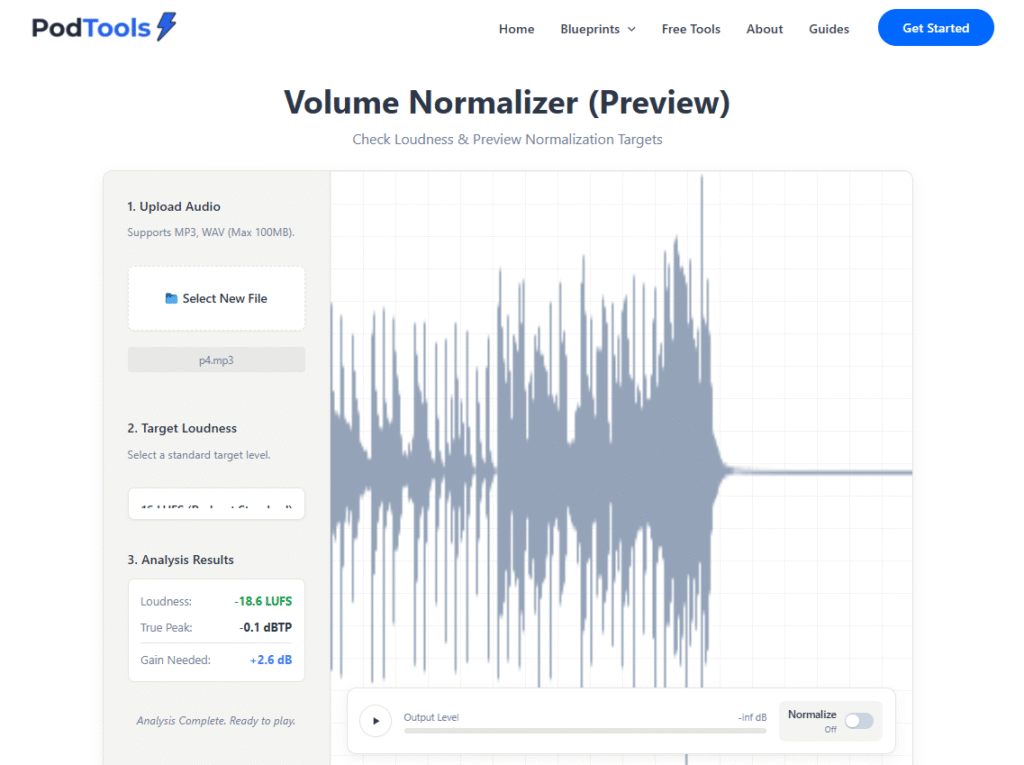
PodTools Loudness Analyzer in action: Instant LUFS feedback.
🔊 Check Your Audio Levels Now
Don’t guess. Know exactly how loud your episode is.Open Free Loudness Analyzer
*Your file stays on your device. 100% Secure.
How to Fix Audio That Is Too Quiet
If you used our tool and found out your audio is at -24 LUFS (too quiet), how do you fix it?
You cannot just turn up the volume knob, or you will hit the “ceiling” (0dB) and cause clipping distortion. You need to use a process called Limiting and Compression.
- Compression: This squashes the loudest peaks of your audio, reducing the dynamic range. It makes the quiet parts louder without making the loud parts distort.
- Normalization: After compression, you use a “Normalize” effect to bring the overall volume up to -16 LUFS.
Most free editing software like Audacity has a “Loudness Normalization” effect built-in. Use it!
FAQ: Common Loudness Questions
Is Mono or Stereo better for podcasts?
For 90% of podcasts (interviews, solo talk), Mono is better. It produces a smaller file size and sounds consistent on all devices. If you use Mono, target -19 LUFS. If you use music or sound effects, stick to Stereo and target -16 LUFS.
Will Spotify reject my podcast if the LUFS are wrong?
No. They won’t reject it. They will just process it. But if your audio is too quiet, listeners in noisy environments (like cars or gyms) won’t be able to hear you, and they will likely stop listening.
What happens if my True Peak is red?
True Peak should generally stay below -1.0 dBTP. If it goes above 0, you get digital distortion (clipping). Our Loudness Analyzer also checks for True Peak errors.
Conclusion
Audio engineering can feel complicated, but getting your loudness right is the single biggest “quick win” for audio quality. Aim for -16 LUFS, and your podcast will instantly sound more professional.
Ready to check your latest episode? Click here to use our free analyzer before you publish.