10 Best AI Podcast Editors for Beginners & Pros (2026)
Editing a podcast used to take hours of tedious timeline cutting. Now, with automatic tools, it takes minutes. We stress-tested the 10 best AI podcast editors on the market to help you choose the right one for your workflow.
Updated: 2026 | Category: Best AI Tools
Disclosure: This article contains affiliate links. We may earn a commission if you verify a purchase, at no extra cost to you. We only recommend tools we have personally tested.
🏆 Quick Summary: Top 3 Picks
| Award | Software | Best For | Starting Price |
|---|---|---|---|
| 🥇 Best Overall | Descript | Text-Based Editing (Mac/PC) | Free / $12/mo |
| 🥈 Best Browser Tool | Podcastle | Chromebook & Web users | Free / $11.99/mo |
| 🥉 Best Audio Repair | Adobe Enhance | Fixing Bad Phone Audio | Free |
According to industry data from Edison Research, the speed of content creation is the biggest hurdle for new creators. Traditional Digital Audio Workstations (DAWs) like Audacity or GarageBand are incredibly powerful, but they require significant technical skill. In 2026, you need the best AI podcast editors to automate the heavy lifting: removing silence, leveling loudness, and cutting filler words.
The Top 3 Best AI Podcast Editors (Deep Dive)
Descript
Descript is widely considered the overall best AI podcast editors for beginners because it entirely removes the technical barrier of waveforms. It transcribes your audio into text, and you edit the podcast by simply deleting words in the document.
🔥 Killer Feature: “Underlord” AI
Descript’s newest AI assistant, Underlord, can automatically find the best 30-second clips for TikTok, remove retakes, and even write your show notes with one click.
- Free: 1 transcription hour/month.
- Creator ($12/mo): 10 transcription hours/mo + 4K video export.
- Pro ($24/mo): 30 hours + Unlimited AI Overdub.
Read our full deep-dive Descript Review here.
Try Descript for Free →Podcastle
If you don’t want to install heavy software, Podcastle is the best AI podcast editors built entirely in the browser. It functions as an all-in-one recording and editing studio, making it absolutely perfect for users on Chromebooks.
🔥 Killer Feature: “Magic Dust”
In our acoustic testing, Magic Dust often sounds more natural than other tools, preserving the richness of the human voice without making it sound robotic.
- Basic (Free): Unlimited audio recording, limited AI editing tools.
- Storyteller ($11.99/mo): Unlocks lossless high-quality downloads and Magic Dust AI.
Adobe Podcast Enhance
While searching for the best AI podcast editors, you might realize you just need basic audio repair. Adobe Podcast Enhance uses speech synthesis to completely rebuild low-quality audio, making it the perfect companion tool.
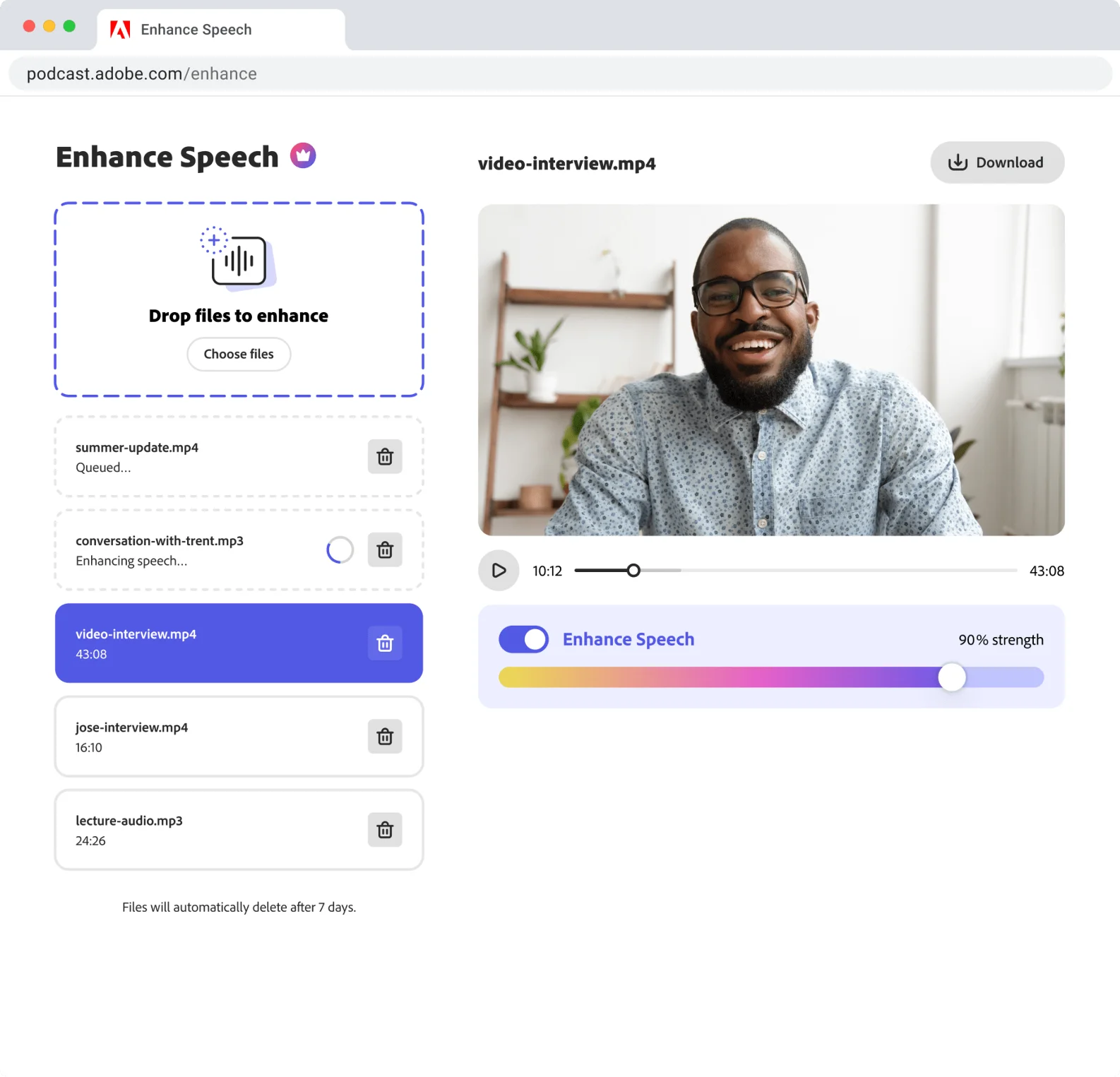
💡 Pro Workflow: Run raw audio through Adobe Enhance -> Download the clean WAV -> Import that file into a main editor like Descript to cut the content.
If Adobe makes you sound too robotic, check out our guide on the best Adobe Enhance alternatives.
Try Adobe Enhance Free →The Best of the Rest (Specialized AI Podcast Editors)
Not everyone needs a full timeline. These remaining best AI podcast editors serve specific, highly valuable needs like automatic video clipping or surgical noise removal.
4. Riverside.fm
From $15/moBest For: Remote Video Podcast Editing.
While known as a remote recording studio, Riverside’s built-in text-based editor is phenomenal. It uses AI to automatically color-code speakers and features “Magic Clips” to find viral moments, easily making it one of the best AI podcast editors for video creators.
5. Auphonic
Free (2 hrs) / CreditsBest For: Final Mastering & Loudness Normalization.
Auphonic is not designed for cutting; it is an automated mastering engineer. It will magically balance volume and ensure you meet the strict Apple Podcasts audio requirements for LUFS loudness. Always check your final file using our Audio Loudness Analyzer.
6. Resound AI
From $12/moBest For: Removing “Umms” & Stutters Surgically.
Resound specializes only in acoustic anomaly detection. It listens for the audio signature of filler words and heavy breaths, providing a gamified interface where you swipe left or right to approve cuts.
7. AutoPod
$29/moBest For: Professional Adobe Premiere Pro Users.
If you edit multi-camera video podcasts inside Premiere Pro, AutoPod is a mandatory plugin. It listens to the audio tracks and automatically cuts the video feed to whoever is speaking. It literally turns your desktop into the best AI podcast editors for multicam setups.
8. Swell AI
From $29/moBest For: Content Repurposing & SEO.
Swell AI doesn’t edit your audio waveforms; it edits your content. Acting as an AI writer, you upload your finished audio, and it automatically generates highly accurate transcripts, SEO-optimized blog posts, and timestamps.
9. Wisecut
Free / $10/moBest For: Automatic YouTube Jump Cuts.
Wisecut is a cloud-based editor tailored for talking-head videos and solo podcasts. It automatically identifies and deletes awkward silences to create snappy “jump cuts” and automatically ducks background music when you speak.
10. Cleanvoice AI
Pay-as-you-goBest For: Removing Mouth Clicks & Stuttering.
While Adobe Enhance is a sledgehammer, Cleanvoice is a scalpel. It specifically targets and removes human audio artifacts like lip-smacking and clicking mouth sounds without making your voice sound like a robot.
🛑 Critical Audio Note: No matter which of the best AI podcast editors you choose, understanding basic EQ is essential. If your raw recordings sound muffled or underwater, you’ll need an editor with a strong High-Pass Filter. Also, learn how to test your room acoustics before relying completely on software.
FAQs about AI Podcast Editing
Can I auto edit a podcast for free?
Yes. You can use the Descript Free Plan (which grants 1 hour of transcription per month) or use Adobe Podcast Enhance for free audio cleaning. Finding the best AI podcast editors can save you money, but for truly unlimited free editing, you will need to learn a traditional desktop tool like Audacity.
What are the best AI podcast editors for beginners on Mac?
Descript is heavily recommended as the best AI podcast editor for beginners on Mac. It is natively optimized for Apple Silicon (M1/M2/M3 chips) and runs extremely smoothly. While Apple’s own GarageBand is free and pre-installed, it lacks modern AI features.
Will AI editing software make my voice sound fake?
It depends on the tool and the severity of the original audio. Generative AI tools recreate your voice using synthesis, which can sometimes produce a robotic or metallic lisp if the background noise was too loud. Subtractive AI tools are much safer for preserving your natural human tone.