Podcast RSS feed errors can prevent directories from reading show metadata, finding episode audio, or displaying artwork correctly. This guide explains how to identify malformed XML, incomplete enclosure elements, unstable GUIDs, missing namespace tags, and inaccessible image references.
Most podcast RSS feed errors must be corrected in your hosting dashboard, CMS, or feed generator. A validation report can identify the affected element, but it cannot change the source feed for you. Passing structural checks also does not ensure approval by Apple Podcasts, Spotify, or another directory because each platform applies its own current requirements.
Start by Diagnosing the Feed
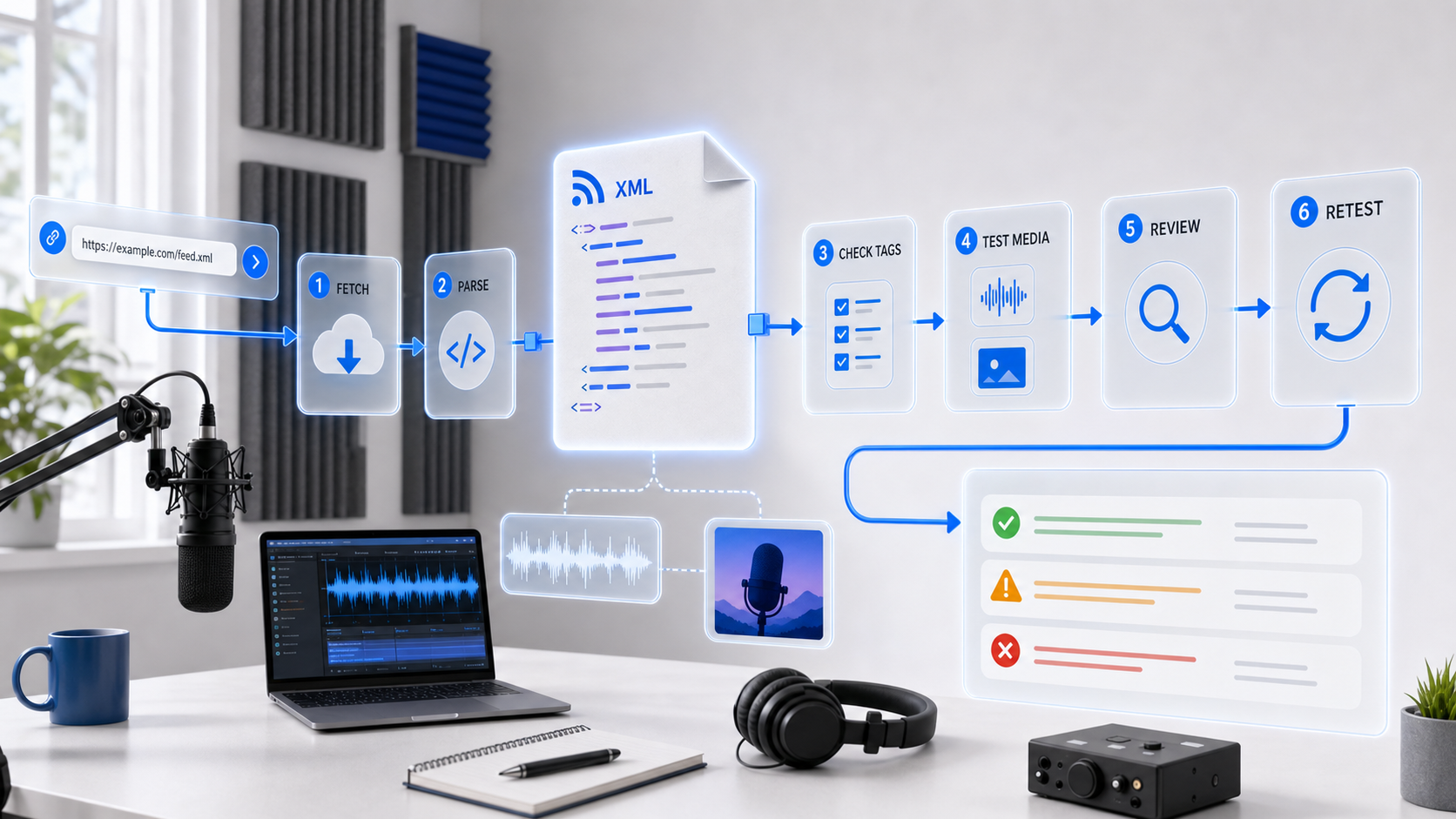
When podcast RSS feed errors appear, begin with a repeatable diagnostic check. Open the Podtools RSS Validator, enter the full feed URL—for example, https://example.com/feed.xml—and review the reported XML, metadata, enclosure, GUID, and artwork findings.
Diagnosing podcast RSS feed errors requires separating the base RSS 2.0 specification from podcast-specific namespace and directory requirements. Fix malformed XML and missing required RSS elements first, then address platform metadata and recommended improvements.
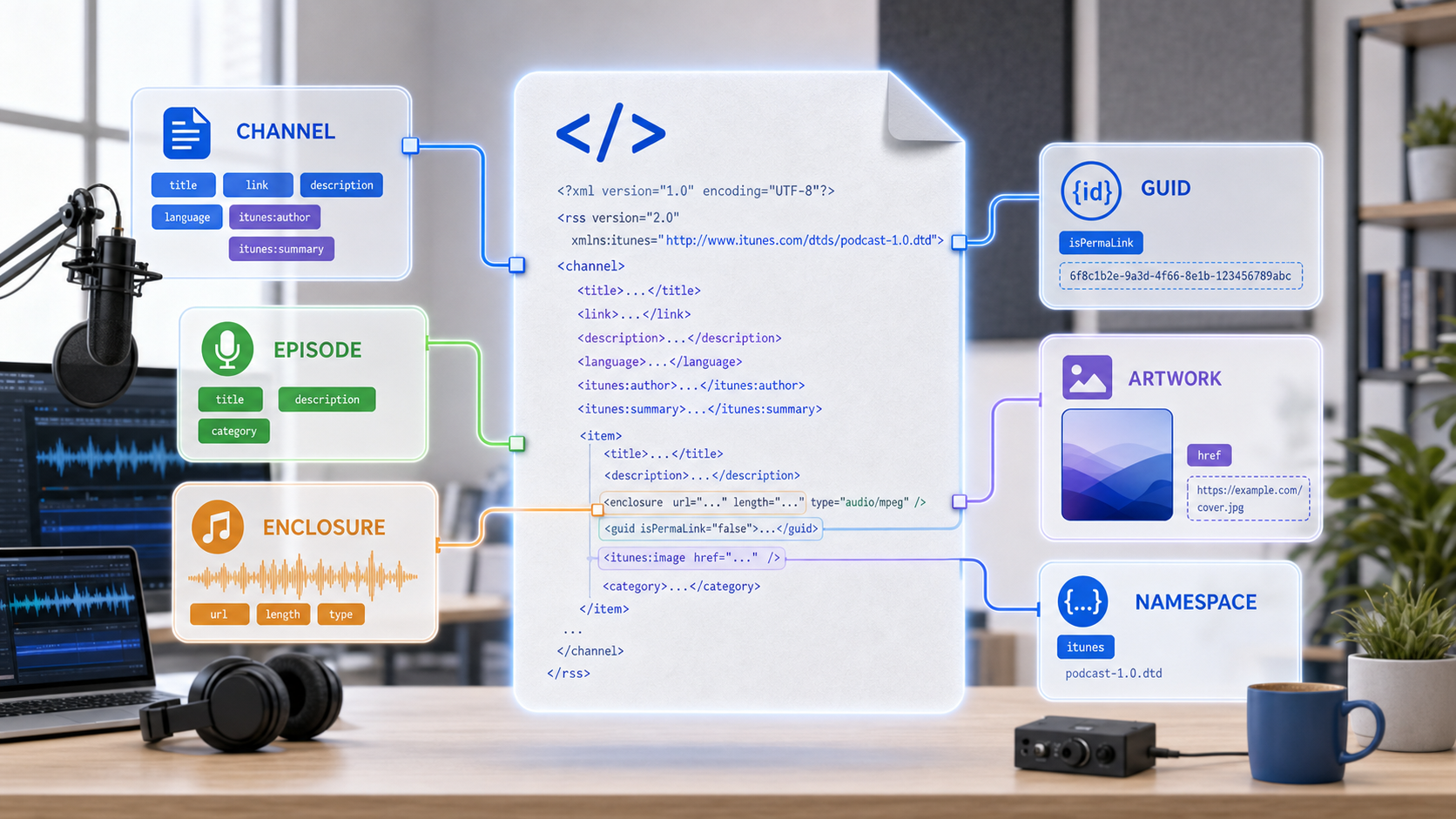
Podcast RSS Feed Errors Covered in This Guide
Understanding what the tool inspects helps you interpret results accurately and decide which issues to fix first. The following table summarizes each check category and what it covers.
| Check Category | What It Inspects | Why It Matters |
|---|---|---|
| XML Structure | Well-formed XML, encoding declaration, valid nesting | Malformed XML prevents any parser from reading your feed |
| Channel Elements | Title, link, description, language, and other required channel-level tags | Directories display this metadata in search results and listings |
| Item Elements | Episode title, enclosure, GUID, publication date | Missing episode data causes playback failures or skipped episodes |
| Enclosure Tags | URL attribute, type attribute, length attribute | Directories use enclosures to locate and deliver audio files |
| iTunes Namespace | itunes:author, itunes:image, itunes:category, itunes:explicit | Apple Podcasts and other platforms read these tags for display and filtering |
| Artwork References | Channel-level image URL and itunes:image href | Missing or incorrectly sized artwork causes display issues in directories |
| GUID Usage | Unique, persistent identifiers for each episode | Duplicate or changing GUIDs cause episodes to appear or disappear unexpectedly |
A Practical Troubleshooting Workflow
Use the following workflow to isolate podcast RSS feed errors without changing several parts of the feed at once.
- Copy the full URL of your podcast RSS feed from your hosting platform or CMS.
- Paste the URL into the RSS Validator.
- Wait for the tool to retrieve and parse the feed. Results appear below the input field.
- Review any errors first, then warnings, then informational notes.
- Fix the podcast RSS feed errors in your hosting platform or feed generator, then re-validate.
Example: Finding an Enclosure Error
To show how podcast RSS feed errors appear in practice, consider a sample feed with a valid XML declaration, a complete channel block, two episode items, and an iTunes namespace declaration. It contains one deliberate issue—a missing length attribute on the second episode’s enclosure tag.
Sample Input
<?xml version="1.0" encoding="UTF-8"?>
<rss version="2.0"
  xmlns:itunes="http://www.itunes.com/dtds/podcast-1.0.dtd">
  <channel>
    <title>Sample Podcast</title>
    <link>https://example.com</link>
    <description>A sample podcast for testing.</description>
    <language>en-us</language>
    <itunes:author>Sample Author</itunes:author>
    <itunes:image href="https://example.com/artwork.jpg" />
    <itunes:category text="Technology" />
    <item>
      <title>Episode 1</title>
      <enclosure url="https://example.com/ep1.mp3"
        type="audio/mpeg" length="24986239" />
      <guid>ep-001</guid>
      <pubDate>Mon, 01 Jan 2026 00:00:00 GMT</pubDate>
    </item>
    <item>
      <title>Episode 2</title>
      <enclosure url="https://example.com/ep2.mp3"
        type="audio/mpeg" />
      <guid>ep-002</guid>
      <pubDate>Mon, 08 Jan 2026 00:00:00 GMT</pubDate>
    </item>
  </channel>
</rss>
Expected Results
These podcast RSS feed errors and successful checks would appear in the report:
- XML Structure: Pass — the document is well-formed with a valid encoding declaration.
- Channel Elements: Pass — title, link, description, and language are all present.
- iTunes Namespace: Pass — the namespace is declared and author, image, and category tags are present.
- Item 1 Enclosure: Pass — URL, type, and length attributes are all specified.
- Item 2 Enclosure: Warning — the
lengthattribute is missing. While some directories tolerate this, the RSS 2.0 specification requires it, and some parsers may reject the enclosure.
This example shows why podcast RSS feed errors should be separated into blocking structural problems and warnings that may affect only certain directories or players.
Interpreting Your Validation Results
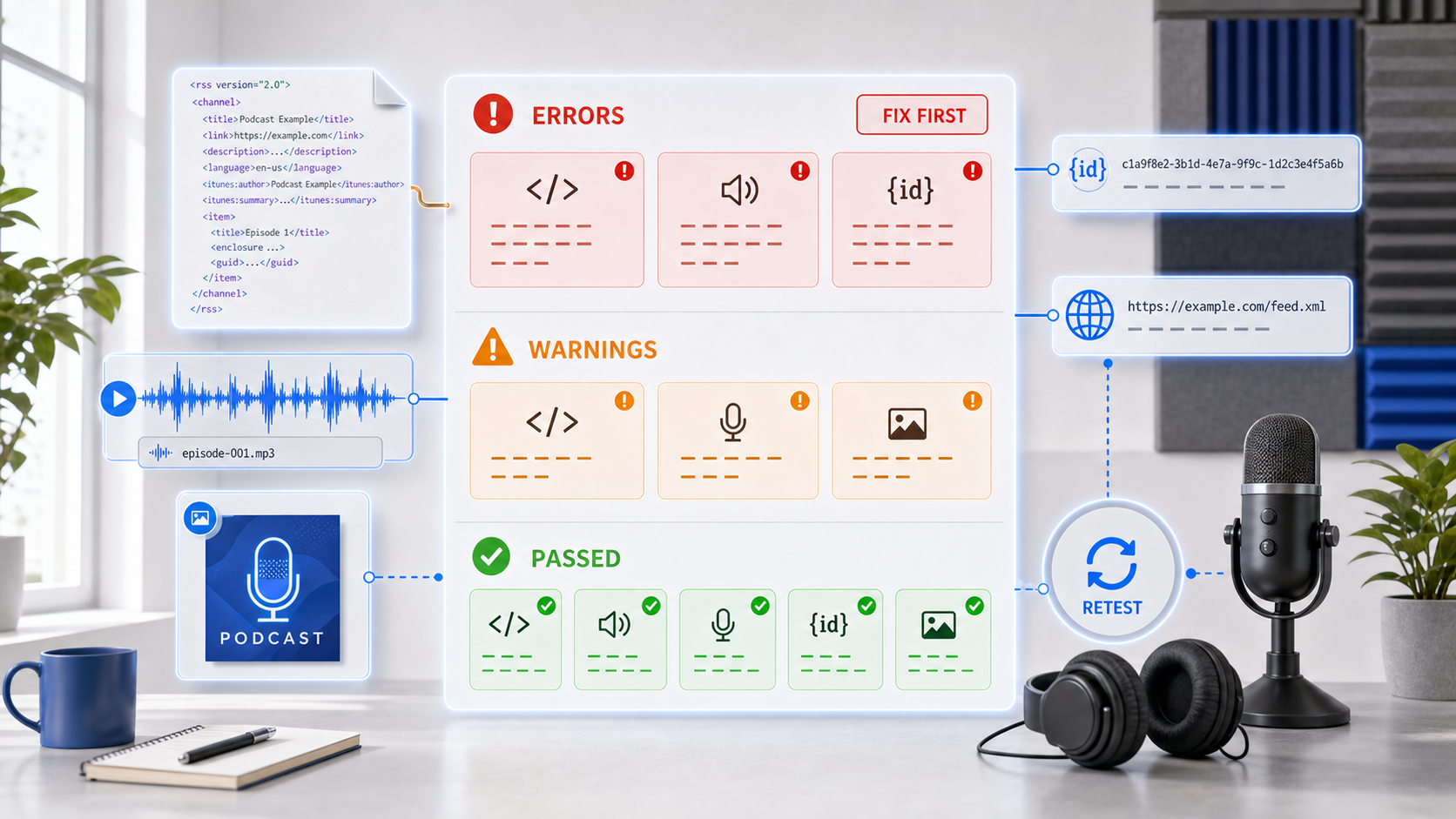
Classifying podcast RSS feed errors into three severity levels helps you prioritize fixes and avoid changing valid elements unnecessarily.
Errors
Errors indicate structural problems that will likely prevent directories from parsing your feed. Common podcast RSS feed errors include malformed XML, missing required channel elements such as <title> or <link>, and missing or empty enclosure URLs. Address all errors before submitting your feed to any directory.
Warnings
Warnings flag podcast RSS feed errors that may not block parsing but can cause problems with specific platforms or listeners. Examples include missing length attributes on enclosures, absent itunes:category tags, or GUIDs that are not unique across episodes. Fix warnings to improve compatibility across directories.
Informational Notes
Informational notes highlight recommendations that improve feed quality but are not required for basic functionality. These might include suggestions to add itunes:explicit tags, provide a more detailed channel description, or include episode-level itunes:duration values.
Common RSS Feed Errors and How to Fix Them
The following podcast RSS feed errors are among the most frequently reported. Work through them in order, then use the validator again to confirm that the source feed now returns the intended structure.
Malformed XML
XML must follow strict syntax rules. These podcast RSS feed errors often come from unescaped ampersands in URLs (use & instead of &), unclosed tags, or mismatched element names. If a CMS or hosting platform generates the feed, malformed XML can indicate a plugin conflict or server-side encoding issue.
Missing Enclosure Attributes
Every episode item must include an <enclosure> tag with three attributes: url (the audio file address), type (the MIME type, typically audio/mpeg), and length (the file size in bytes). Podcast RSS feed errors in any of these attributes can cause directories to skip the episode.
Duplicate or Changing GUIDs
Each episode needs a globally unique identifier (GUID) that never changes. Podcast RSS feed errors involving duplicate GUIDs can hide one episode, while a changed GUID may cause directories to treat an existing episode as new. Use a consistent, permanent identifier such as a UUID or a stable episode slug.
Missing iTunes Namespace Tags
While the iTunes namespace is technically optional under RSS 2.0, Apple Podcasts relies on podcast-specific tags for author information, category placement, and artwork display. Podcast RSS feed errors in this area usually involve a missing namespace declaration or incomplete itunes:author, itunes:image, and itunes:category elements.
Artwork Issues
The itunes:image tag must reference a publicly accessible image URL. Podcast RSS feed errors can be triggered by missing artwork, an unreachable file, an unsupported format, or dimensions outside the platform’s current requirements. Use the Podcast Cover Art Size Checker before publishing.
Validation Checklist Before Submitting Your Feed
Use this checklist to confirm your feed is ready for directory submission.
- XML is well-formed with no parsing errors
- Channel includes title, link, description, and language
- iTunes namespace is declared with author, image, and category
- Every episode item has a title, enclosure with all three attributes, a unique GUID, and a publication date
- Artwork URL is publicly accessible and meets dimension requirements
- Audio file URLs in enclosures are publicly accessible and return correct MIME types
- Feed URL itself is permanent and will not change after submission
Testing Private or Restricted Feeds
Some apparent podcast RSS feed errors occur because a feed is private, password-protected, or blocked from retrieval. The Podtools tool parses the feed in the browser, but the feed URL still has to reach the server hosting the XML document. Review access controls before testing private information with any public validation workflow.
Related RSS and Metadata Tools
Validation is one step in a broader feed management workflow. The following tools support adjacent tasks:
- Podcast RSS Feed Generator — create a new feed from scratch with correct structure and namespace declarations
- RSS and Metadata Tools Hub — browse the full collection of feed and metadata utilities
- ID3 Tag Editor — embed metadata directly into MP3 files before upload
- Cover Art Size Checker — verify artwork dimensions for directory compliance
Frequently Asked Questions
What causes podcast RSS feed errors?
Podcast RSS feed errors can originate in malformed XML, missing RSS elements, incomplete podcast namespace metadata, unreachable media files, unstable GUIDs, or hosting access rules. A validation report helps identify the affected element so you can correct it in the system that generates the feed.
What does it mean if my feed has malformed XML?
Malformed XML means the document contains syntax errors that prevent parsers from reading it. Common causes include unescaped special characters, unclosed tags, or incorrect nesting. A feed with malformed XML cannot be processed by any directory until the syntax errors are corrected.
Are the required tags different for Apple Podcasts and Spotify?
Both platforms require a valid RSS 2.0 feed with standard channel and item elements. Apple Podcasts places additional emphasis on iTunes namespace tags and has specific artwork and content requirements documented in their Podcast Requirements guide. Spotify accepts standard podcast RSS feeds and reads iTunes namespace tags when available.
What should I do after finding an error?
Fix podcast RSS feed errors in your hosting platform or feed generator, then re-run the validator to confirm the change. If the problem comes from your host’s feed output, contact its support team with the specific message and affected element. For a manually created feed, correct the source XML rather than editing a temporary downloaded copy.
Can I validate a private or password-protected feed?
The validator needs to retrieve the XML document from the feed URL. If your feed is behind authentication, the validator will not be able to access it. Consider temporarily making the feed public for validation, or download the XML file and use a local XML parser to check for well-formedness.
How often should I validate my podcast RSS feed?
Validate your feed before submitting to any new directory, after making structural changes to your feed template, and whenever episodes fail to appear in directories. Regular validation is not necessary if your feed is generated by a stable hosting platform and you have not changed its configuration.
Resolve Errors, Then Retest the Source Feed
Resolving podcast RSS feed errors starts with identifying whether the failure comes from XML syntax, required metadata, an episode enclosure, a GUID, artwork, or feed access. Make one source-level correction at a time and retest after each change. Use the broader RSS and metadata tools when you need to generate a feed, inspect artwork, or prepare episode metadata.