Riverside.fm Review: Is it the Best Remote Recording Tool?
Stop letting bad WiFi ruin your podcast. Here is why top creators are switching to local 4K recording.
Disclosure: We may earn a commission if you purchase through our links, at no extra cost to you.
As a podcaster, your credibility depends on your quality. Listeners will tolerate a boring guest, but they will not tolerate bad audio.
Enter Riverside.fm. It promises “Studio Quality” from anywhere in the world. But does it deliver? We conducted a full riverside.fm recording quality test to find out.
What is “Local Recording” and Why Do You Need It?
Riverside is different because it uses Local Recording.
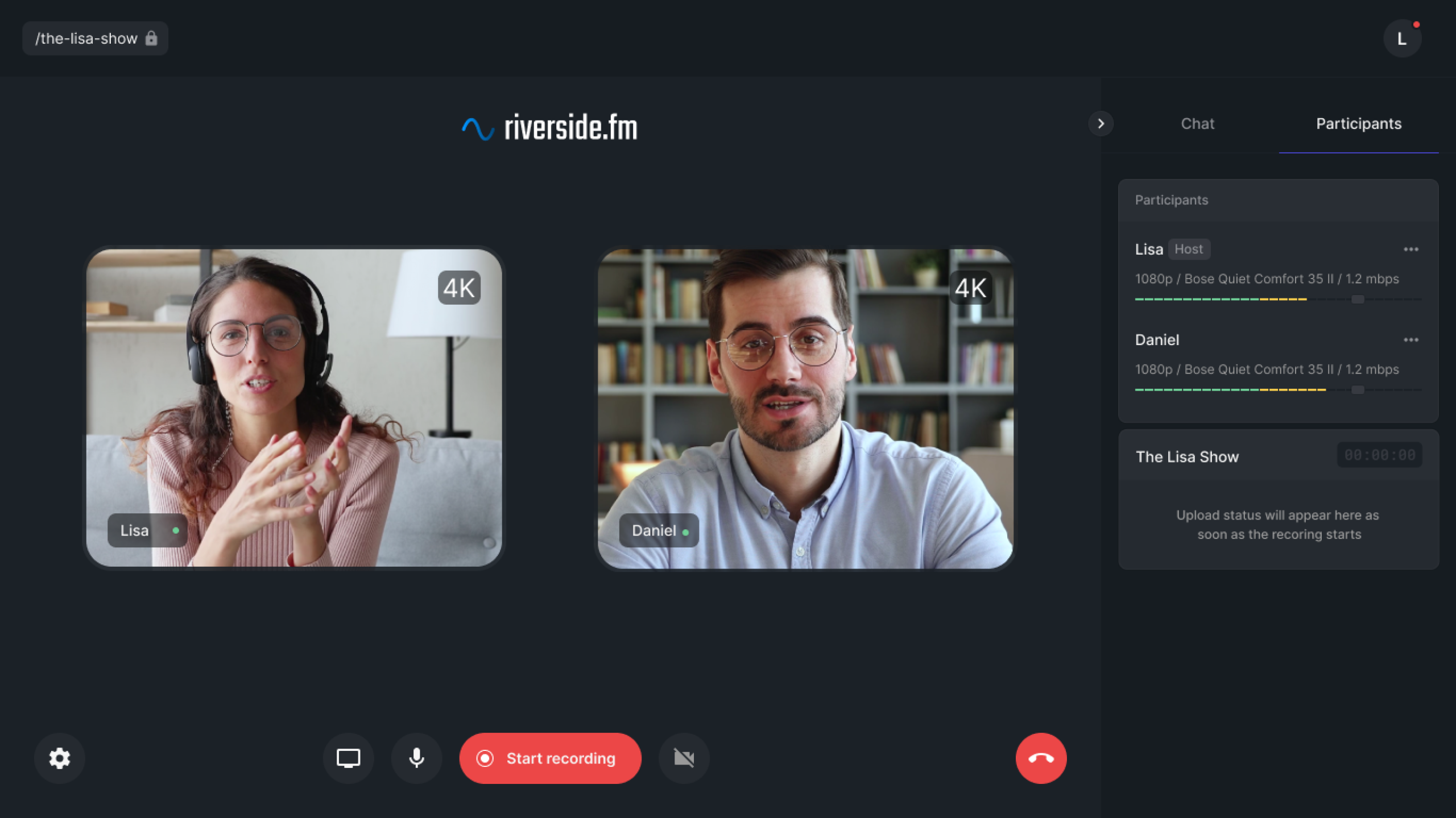
When you record on Riverside, it captures the video and audio directly on your guest’s computer (locally), independent of the internet connection. While you are talking, it quietly uploads the high-quality file in the background.
- Zoom: Records what it streams over the internet (Glitchy, Low Res).
- Riverside: Records what the camera sees (Crisp, 4K).
🎥 The Test: Remote Podcast Recording Software 4K
We tested Riverside with a guest who had a terrible internet connection (5Mbps upload speed).
The Result:
- During the call, the video feed looked a bit blurry (because it was streaming live).
- BUT, once the recording finished and the file uploaded, the final video was crystal clear 4K.
This is the magic of using dedicated remote podcast recording software 4K capabilities. You get separate audio (WAV) and video (MP4) tracks for every guest, which is a dream for editors.
❌ Zoom (Pixelated) vs ✅ Riverside (4K Crystal Clear)
Grow Faster with AI Magic Clips
Recording is only half the battle. Promotion is the other half.
This is where the riverside fm magic clips example comes into play. You don’t need to hire an expensive video editor to make TikToks.
✨ How Magic Clips Work
After your recording is done, you click one button. Riverside’s AI analyzes the transcript, finds the most engaging “hooks,” and automatically generates 10+ vertical short videos.
- Auto-Reframing: Keeps the active speaker in the center.
- Auto-Captions: Adds colored subtitles automatically.
- Customization: You can change the brand colors and fonts.
Riverside.fm vs. Zoom
| Feature | Riverside.fm | Zoom |
|---|---|---|
| Video Quality | Up to 4K | 720p/1080p (Compressed) |
| Audio Quality | 48kHz WAV (Uncompressed) | Compressed M4A |
| Local Recording | Yes | No |
| AI Clips | Magic Clips (Best in Class) | No |
The Verdict: Pros & Cons
✅ Why We Love It
- ✔️ Bulletproof 4K video quality.
- ✔️ Separate tracks for every guest.
- ✔️ Magic Clips saves hours of editing time.
- ✔️ Guest interface is extremely simple (no login required).
❌ What Could Be Better
- ❌ Guests must keep the browser open to finish uploading.
- ❌ Audio editing features are basic compared to Descript.
Riverside.fm
If you care about video quality, Riverside is the industry standard. It creates the highest quality source files possible for remote interviews. Combined with AI Magic Clips, it’s a growth machine.
Comparing other tools? Check out our list of the Best AI Podcast Software in 2026.
Frequently Asked Questions
Does Riverside actually record in 4K?
Yes. Based on our riverside.fm recording quality test, it captures true 4K video locally from your camera, regardless of internet speed. Note: You need a 4K webcam to utilize this fully.
Is Riverside better than Zoom for podcasts?
Absolutely. Zoom compresses audio and video heavily. Riverside records uncompressed audio (WAV) and high-bitrate video (MP4) locally, making it the superior remote podcast recording software 4K solution.
Can I edit videos in Riverside?
Yes. Riverside now has a text-based editor. However, its strongest feature for editing is the riverside fm magic clips example, which automates social media content creation.