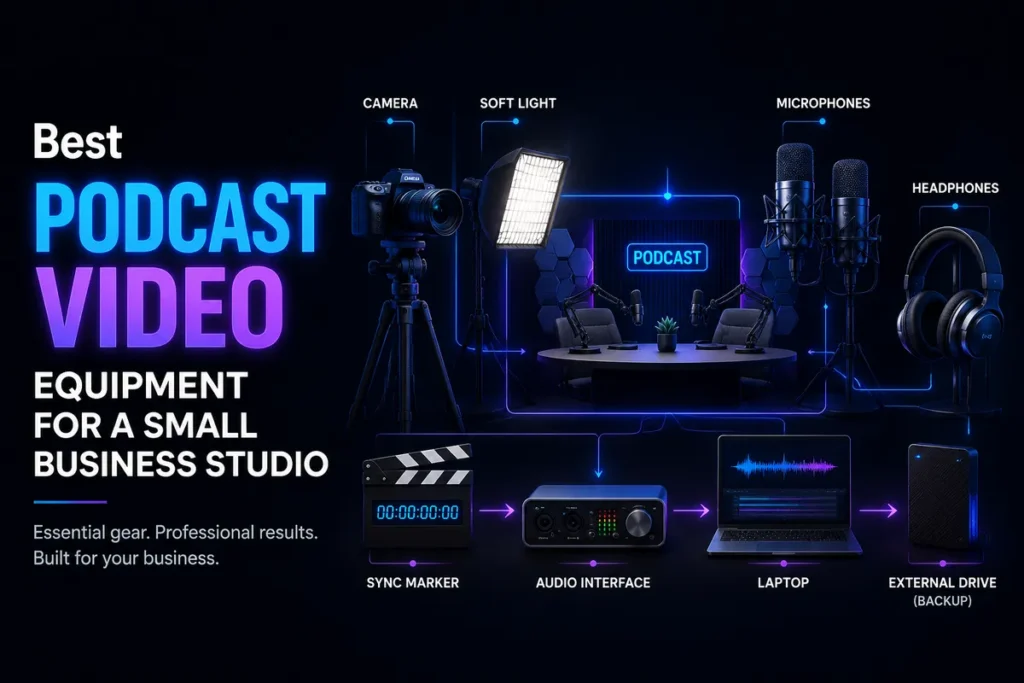
Choosing among podcast equipment bundles can reduce setup decisions, but a product photo is not proof that a package is production-ready. A bundle may combine microphones, an interface, headphones, stands, cables, and software—or leave out one item that you must buy immediately. This guide evaluates bundled packages by real-world completeness, upgrade flexibility, guest scalability, connection type, and hidden costs.
These are category-level recommendations rather than hands-on product test results. Contents, included software, availability, warranties, and retailer-created package combinations can change. Before purchasing, verify the current box contents and specifications on the manufacturer or seller page. For example, RØDE’s current podcast kit range shows how manufacturers may group microphones, studio arms, headphones, and related components into different package formats.
Who should buy a podcast equipment bundle?
A bundle is useful when you want a predictable starting point instead of researching every microphone, cable, stand, and adapter separately. That makes bundled equipment especially practical for small businesses, consultants, marketing teams, nonprofits, and founders who need to launch a show without turning the purchasing process into a separate project.
Consider a bundle if:
- You are starting a solo, co-hosted, or small interview show.
- You want matching microphones and accessories.
- You need a repeatable setup for a home office or small studio.
- You prefer one purchase with a clearer compatibility path.
- You know whether your show will be solo, local-interview, remote, or video-first.
A bundle may be less suitable if you already own a high-quality microphone, need four or more local speakers, use a specialized camera system, or have unusual room-acoustic requirements. In those situations, buying components individually may reduce duplication and let you solve the actual weakness in your setup.
What should a complete podcast equipment bundle include?
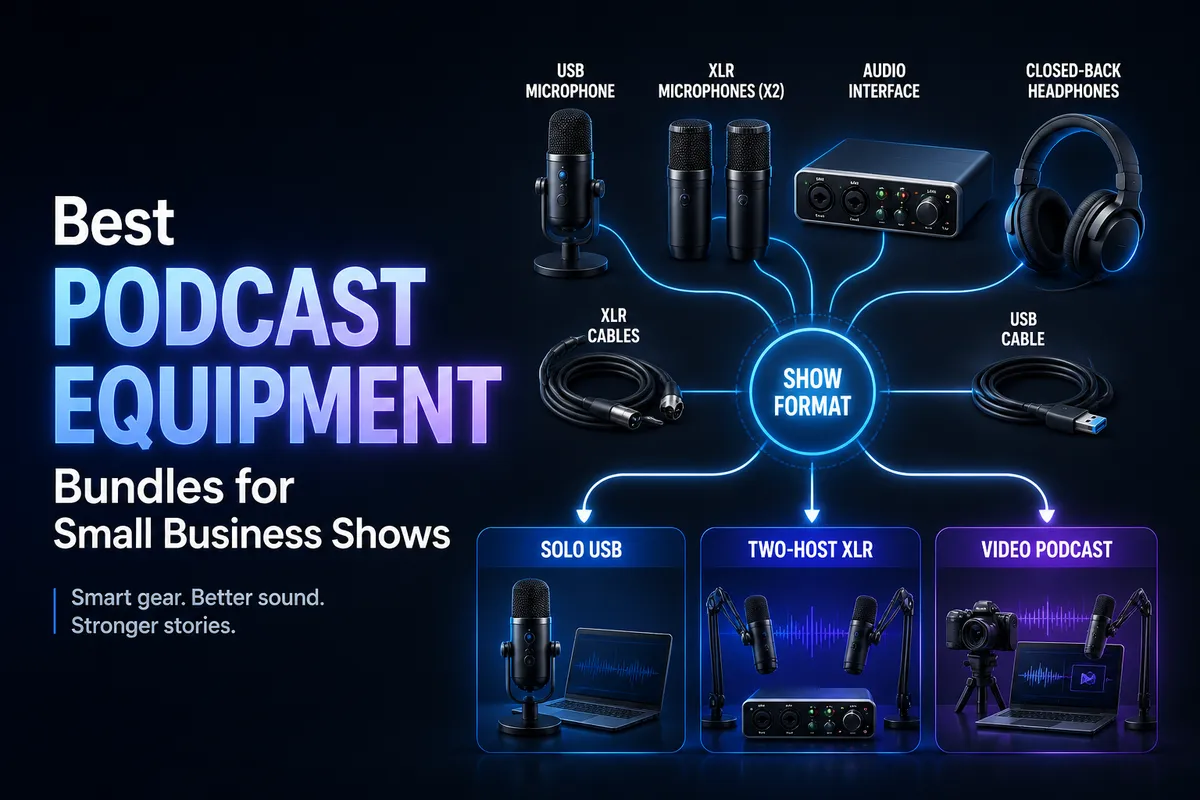
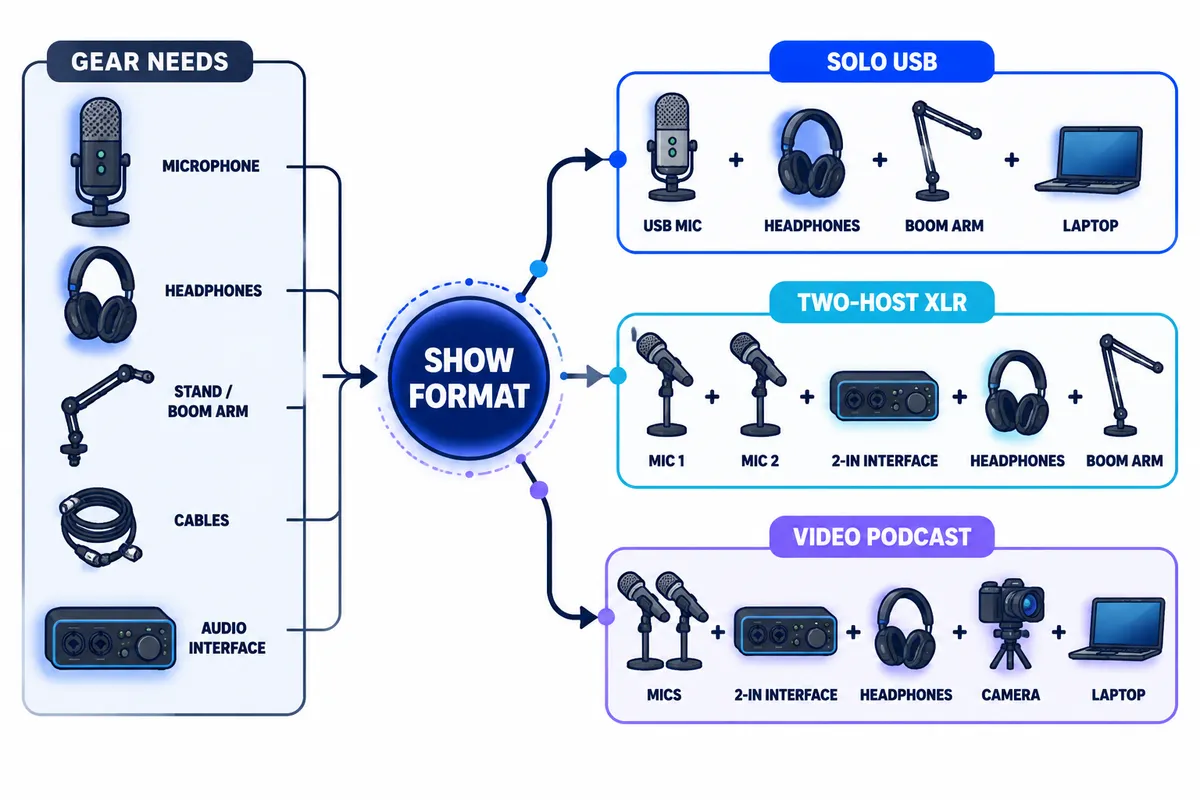
Judge completeness by the recording chain, not by the number of objects in the product image. A basic XLR podcast chain normally includes a microphone, microphone support, an audio interface, a computer, and monitoring. Focusrite’s podcast hardware guide identifies a microphone with stand, audio interface, and computer as the core hardware chain. Its broader podcasting equipment guidance also lists headphones, microphones, pop protection, and room treatment as additional considerations.
Core components to check
- Microphone: Confirm whether it is USB, XLR, or dual-connection. A dynamic microphone can be a practical choice in a busy or untreated office, but room noise, placement, and speaking technique still matter.
- Stand or boom arm: Check whether the support fits your desk, holds the microphone securely, and allows repeatable positioning.
- Interface or recorder: Required for conventional XLR microphones. It converts the analog microphone signal into a computer-ready signal and generally provides gain controls and headphone monitoring.
- Headphones: Closed-back headphones help participants monitor speech without sending the playback into the microphone. Count the number of headphones, not merely whether “headphone monitoring” is mentioned.
- Cables: Every XLR microphone needs its own XLR cable. USB microphones need the correct computer cable, while interfaces may require USB-C, USB-A, or an adapter.
- Pop protection: A grille, pop filter, or windscreen may reduce distracting plosive sounds. Do not assume one is included.
- Power and software: Confirm whether the device is bus-powered, requires a wall adapter, or includes only a limited software trial.
Our completeness rule: A bundle should let your intended speakers connect, monitor, record, and position their microphones without an immediate “surprise” purchase. If it cannot, treat the package as a component bundle—not a complete setup.
Best bundle categories for small business podcasts
There is no universal best package. The strongest choice depends on how many people record locally, whether the show is audio-only or video-first, and whether you expect the format to expand.
Best for solo hosts: compact USB bundle
A solo USB bundle usually combines one USB microphone with a stand or arm, cable, and sometimes headphones or pop protection. It is the simplest option for a founder recording alone at a desk.
Strengths: USB packages usually have fewer hardware decisions, fewer signal-routing steps, and a smaller footprint. They are also convenient for moving between offices or recording locations.
Limitations: Adding a local guest later can be awkward. Each USB microphone must connect to the computer, and your recording software and operating system must handle the required inputs consistently. Focusrite notes that recording guests with multiple USB microphones can become difficult, while an interface can connect multiple microphones through one computer connection.
Best fit: One host, one recording location, short setup time, and no immediate plan for regular in-person guests.
Best for a host and guest: two-microphone XLR bundle
A two-person XLR package generally includes two dynamic microphones, two stands or arms, two XLR cables, an interface with two microphone inputs, and either two headphones or a clear headphone-expansion path.
Strengths: Each person gets an independent channel. That gives you better control over levels, interruptions, and editing than a single shared microphone. It also creates a more obvious path to replacing microphones or adding accessories later.
Limitations: The package has more parts to configure, and a two-input interface is not automatically expandable to four people. Confirm that both inputs are microphone inputs rather than one microphone input plus a line-level connection.
As a useful specification example, Focusrite’s Vocaster Two documentation describes two independent microphone preamps, USB-C computer connection, headphone monitoring, and phone and camera connections. That does not make every Vocaster bundle the right purchase, but it illustrates the features worth checking in any two-person package.
Best fit: A host with recurring local guests, a co-hosted show, or a business podcast that needs separate voice tracks.
Best for remote interviews: solo recording bundle plus remote workflow
Remote interviews do not necessarily require two microphones at your location. The more important questions are whether your own microphone is reliable, whether headphones prevent feedback, and whether the remote recording platform captures separate or high-quality tracks.
A practical remote bundle may include one USB microphone, closed-back headphones, a stable stand, and any required computer adapter. If you also take phone call-ins or livestream, prioritize an interface with phone connectivity, loopback, or camera output rather than buying a second microphone that will rarely be used.
After recording, compare your production options with our guides to Riverside vs. Descript and the best AI transcription tools for podcasters.
Best for video podcasts: camera-ready creator bundle
A video podcast bundle must solve both audio capture and visual placement. Look for microphone arms that stay outside the frame, a way to send audio to the camera or video recorder, and hardware that can be positioned consistently across filming days.
For a manufacturer-level example, Focusrite lists camera connectivity, phone connectivity, two microphone inputs, two headphone outputs, and loopback on its Vocaster Two product page. These features are useful evaluation criteria for video-oriented bundles, regardless of which brand you choose.
Microphone and interface quality: what matters in practice?
The microphone shapes the captured voice, but it does not work in isolation. Room reflections, keyboard noise, HVAC noise, microphone distance, and gain settings can affect the result as much as the model name.
For most small business shows, prioritize:
- A microphone with a speech-appropriate pickup pattern.
- A stable support that keeps distance and angle consistent.
- Enough gain for the chosen microphone.
- Independent channels for each local speaker.
- Direct or low-latency headphone monitoring.
The USB-versus-XLR distinction is also not a simple quality ranking. Focusrite explains that both USB and XLR microphones are used for podcasting, while an interface-based setup makes it easier to change microphones or expand the number of microphones later. That is why our scoring treats connection type as an upgrade and scalability question—not as a guarantee of better sound.
For XLR packages, inspect the interface as carefully as the microphone. Confirm input count, gain range, headphone outputs, monitoring controls, computer connection, and whether the unit supplies phantom power if your chosen microphone requires it. Focusrite’s user guide explains that its XLR inputs support dynamic and condenser microphones and that condenser microphones may require 48-volt phantom power. Always follow the microphone manufacturer’s instructions before enabling phantom power.
Headphones, stands, cables, and accessories
Accessories often determine whether a bundle is genuinely usable. A package with two microphones but one stand, one headphone, or cables that cannot reach the table may be less valuable than a smaller package with every necessary connection.
Headphones
Closed-back headphones are generally the safer choice for local recording because they reduce the chance that monitoring audio reaches the microphone. For two local speakers, two headphones are preferable. If the interface has only one headphone output, budget for a suitable distribution solution and check how it affects volume control.
Stands and boom arms
Desk stands are compact, but they use table space and can transmit bumps. Boom arms can improve positioning and keep microphones outside a video frame. Check clamp depth, desk thickness, reach, cable routing, and supported weight.
Cables and adapters
Count cables individually. Two XLR microphones require two XLR cables. USB equipment may require a specific cable or adapter for your computer. “Computer compatible” does not necessarily mean the correct adapter is included.
Pop filters and shock mounts
These accessories can reduce plosives and mechanical vibration, but they should come after the basics. Missing microphones, cables, interface inputs, or headphones are more serious omissions than a missing pop filter.
USB versus XLR podcast equipment bundles
| Consideration | USB bundle | XLR bundle |
|---|---|---|
| Setup | Usually faster and simpler | Requires an interface or mixer |
| Initial parts | Fewer components | Microphone, interface, cables, and monitoring |
| Solo recording | Convenient | May provide more capacity than needed |
| Local guests | Can become complicated | Independent microphone channels are easier to plan |
| Upgrade flexibility | Depends on the microphone and computer workflow | Usually easier to replace microphones or add channels |
| Portability | Typically easier to carry | More hardware to transport |
Choose USB when simplicity, portability, and solo recording matter most. Choose XLR when you expect local guests, want independent tracks, or are building a small studio that may grow. A dual USB/XLR microphone can offer flexibility, but it does not solve every future limitation: you still need enough interface inputs, headphone outputs, cables, and physical space.
Compatibility checklist before buying
- Computer: Does your computer have the required USB port and operating-system support?
- Inputs: Is there one microphone input for every local speaker?
- Headphones: Can every local participant monitor the conversation?
- Connection: Are the microphones USB, XLR, or dual-connection models?
- Power: Is the system bus-powered, or does it require a wall adapter?
- Room: Will stands and arms fit your desk or filming table?
- Software: Is included software permanent, time-limited, or subscription-based?
- Camera: Can the audio feed reach your camera or video recorder?
- Remote guests: Does your workflow support separate guest capture?
- Future growth: Can you add a microphone without replacing the interface?
Do not assign full value to bundled software until you check the license period and renewal terms. A six-month editor or hosting offer may be helpful, but it should not persuade you to buy hardware that does not fit your recording plan.
Value and upgrade analysis: calculate the usable cost
The headline bundle price is only the first number. Calculate the cost of making the package usable in your actual room and workflow.
For a solo USB package, possible additions include headphones, a better arm, a pop filter, a USB adapter, acoustic treatment, and editing software. For an XLR package, additions may include extra cables, a second headphone solution, a headphone amplifier, mic arms, shock mounts, or a higher-capacity interface.
Next, estimate your first likely upgrade. If you expect to add a co-host within six months, a very cheap one-input package may create a replacement cost. If you will remain solo, paying for four microphone inputs may tie up money in capacity you will not use.
Our value test: subtract the cost of duplicate or unused components, then add the cost of missing essentials and the first likely upgrade. The best bundle is the one with the lowest usable cost for your next stage—not necessarily the lowest checkout price.
Buying recommendations by show type
Choose a solo USB bundle if:
- You record alone most of the time.
- You want the shortest setup path.
- You travel or move between workspaces.
- You do not expect regular in-person guests.
Choose a two-microphone XLR bundle if:
- Your show regularly features a host and local guest.
- You want separate tracks for editing.
- You plan to replace microphones or add studio accessories later.
- You prefer a conventional interface-based workflow.
Choose a video-focused bundle if:
- You will publish full episodes to YouTube or social platforms.
- Microphone placement must remain outside the camera frame.
- You need camera, phone, or computer audio routing.
- You want the same setup to work across repeated filming sessions.
Final verdict: buy for the next 12 episodes
For most small business creators, the best podcast equipment bundle is not the one with the largest item count. It is the package that covers the next stage of production without forcing a costly replacement after a few episodes.
Solo hosts should usually prioritize a compact USB package or one-person interface setup. Interview shows should look for two independent microphone channels, two monitoring paths, and stable positioning hardware. Video podcasts should value camera connectivity and clean microphone placement before decorative extras.
Once the hardware is chosen, your publishing workflow matters just as much. Use our guide to creating a podcast workflow with AI tools to plan recording, editing, repurposing, and publishing. After launch, keep your feed healthy with the RSS validator guide, and turn strong episodes into search-friendly content with our guide to turning podcast episodes into blog posts.
Before ordering, compare the current contents rather than relying on an old marketplace image. Manufacturer kits and retailer bundles can change, software offers can expire, and a package described as “complete” may still omit an adapter or second headphone path. A careful compatibility and upgrade check is what turns a convenient bundle into a dependable business podcast setup.
Frequently asked questions
What is the best podcast equipment bundle?
The best bundle depends on the show format. A solo USB package is usually the simplest choice for one host. A two-microphone XLR package is generally more suitable for local interviews and future expansion. A video podcast needs additional attention to camera routing, microphone placement, and repeatable setup.
What equipment do most podcasters use?
A basic setup commonly contains a microphone, stand, headphones, computer, and recording software. XLR systems add an audio interface and XLR cable. The exact combination varies by whether the show is solo, locally recorded, remote, or video-first. Focusrite’s podcasting equipment overview separates core hardware from additional equipment such as headphones, pop protection, and sound treatment.
How much does a full podcast setup cost?
There is no single reliable total because “full setup” can mean one USB microphone or a multi-person studio with interfaces, headphones, stands, cameras, lighting, and acoustic improvements. Compare the complete usable system, including adapters, extra cables, and likely software renewals, rather than comparing bundle headline prices alone.
Can I use a podcast bundle for video?
Often, yes, but not every audio bundle is video-ready. Check whether the interface can send audio to your camera or video workflow, whether microphone arms stay outside the frame, and whether the included stands are stable enough for repeated filming.